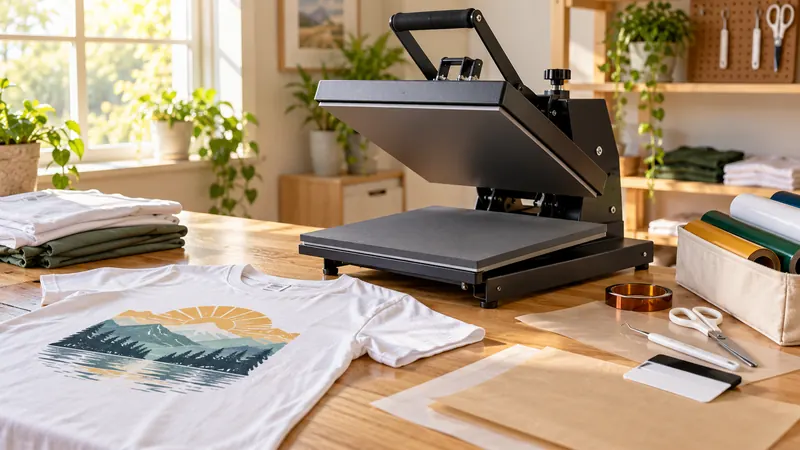
A first heat press can look deceptively simple. Set a temperature, place a transfer, lower the platen, and wait. In practice, beginners quickly run into choices that affect the whole experience: a flat 15 x 15-inch press behaves differently from a small handheld unit, a swing-away design needs more room around the machine, and a multifunction model may offer useful attachments that a single-purpose press cannot. The wrong choice can leave a new user wrestling with cramped layouts, awkward pressure adjustments, or accessories that never leave the box.
For a first machine, the useful details are concrete. Look at the pressing area, the way pressure is adjusted, the temperature and timer controls, the opening mechanism, and whether the supplied applications match the projects you actually expect to make. Some beginners want a straightforward flat press for shirts and tote bags. Others need a cap attachment, a compact tool for small designs, or automated pressing that removes one more manual step. The VEVOR 12 x 15-inch 5-in-1 is the strongest overall match here because it combines a conventional shirt platen with stated cap, mug, and plate attachments while keeping the controls visible and adjustable.
The products below cover several kinds of beginner workflows, from full-size digital machines to handheld presses for small transfers. Their differences matter more than a seller’s broad claims about ease or professionalism. A beginner making occasional shirts may value simplicity and footprint, while someone experimenting with mugs and hats may prefer attachments even with a smaller flat platen.
Quick Answer
- Best Overall: VEVOR Heat Press Machine 12 x 15-inch 5-in-1 for beginners who want one machine with several stated pressing formats.
- Best Automatic Option: HTVRONT Auto Heat Press Machine 15 x 15 for users who prefer automatic pressing and auto-release.
- Best for Small Projects: HTVRONT Mini Heat Press for small or unusually shaped HTV and sublimation projects.
- Best for Cricut Projects: Cricut EasyPress SE 12 x 10 for users who want a portable handheld format with a supplied heat guide.
Best Heat Press for Beginners Comparison Table
| Product | Best For | Press Type | Pressing Area or Attachment | Temperature Control | Notable Feature |
|---|---|---|---|---|---|
| VEVOR 12 x 15-inch 5-in-1 | Broad beginner experimentation | 360° swing-away | 12 x 15 inches, cap, mug, and plate attachments | 0 to 450°F | 0 to 999-second timer |
| HTVRONT Auto Heat Press 15 x 15 | Hands-free shirt pressing | Automatic press with slide-in board | 15 x 15 inches | Reaches stated common-use temperatures | Auto-adjusts thickness up to 1 inch and auto-releases |
| VEVOR 15 x 15 2-in-1 | Shirts and caps | 360° swing-away | 15 x 15 inches and 6 x 3-inch cap platen | Digital temperature control | Flat and curved pressing formats |
| Fancierstudio Digital 15 x 15 | Traditional flat-press learning | Manual digital press | 15 x 15 inches | 0 to 699°F | Adjustable pressure and 110V, 1800W specification |
| HTVRONT Mini Heat Press | Small and unusual designs | Handheld mini press | Mini pressing surface | 284°F, 320°F, or 356°F | Three heat settings and insulated base |
| Calogy Mini Heat Press | Compact craft work | Handheld mini press | 2.87 x 4.43-inch heat plate | Three temperature levels | LED temperature display and 15-minute auto-off |
| Cricut EasyPress SE | Cricut-style handheld projects | Handheld press | 12 x 10 inches | Up to 400°F | Heat Guide and ceramic-coated heat plate |
The detailed picks below show where each format fits, along with the limitations that may matter before a first purchase.
1. VEVOR Heat Press Machine 12 x 15-inch 5-in-1 — Best Overall

A beginner often discovers new projects in a slightly chaotic order. A shirt becomes a tote, the tote becomes a cap, and soon a mug or decorative plate enters the plan. The VEVOR 5-in-1 addresses that kind of experimentation with a stated 12 x 15-inch flat platen plus a 6 x 3-inch cap press, an 11-ounce mug press, and two plate presses for 5-inch and 6-inch maximum diameters. That package gives the machine a wider project range than a standard flat press, although each attachment has its own size limits.
The main flat unit uses a 360-degree swing-away design, a pressure-adjustment knob, and a digital controller with a stated 0 to 450°F temperature range and 0 to 999-second timer range. The swing-away movement changes how a shirt is loaded and gives the upper platen a clear path away from the work area. A Teflon-coated platen and built-in completion beep are also listed. Beginners should still follow the instructions for each transfer and blank, since the machine’s broad temperature range does not establish a universal setting for every material.
Pros
- Includes a stated 12 x 15-inch flat platen.
- Includes cap, mug, and two plate attachments.
- Uses a 360-degree swing-away design.
- Provides a pressure-adjustment knob.
- Lists a 0 to 450°F temperature range and 0 to 999-second timer range.
Cons
- The flat platen is smaller than the 15 x 15-inch options in this selection.
- The supplied mug and plate attachments have stated size limits, so they are not universal drinkware or plate tools.
This model fits a beginner whose interests extend beyond shirts and who has room to work with a swing-away machine and several attachments. Someone focused exclusively on flat apparel may prefer a simpler 15 x 15-inch press, while a user who expects small, detailed designs may want a handheld model. Its central trade-off is breadth: more formats are available, but each specialty attachment has a defined use rather than unlimited compatibility.
To buy this product, click here.
2. HTVRONT Auto Heat Press Machine 15 x 15 — Best Automatic Option

The HTVRONT automatic model is aimed at beginners who would rather avoid manually holding or releasing a traditional upper platen. Its 15 x 15-inch pressing area gives apparel projects a familiar full-size format, while the slide-in board keeps the garment positioned inside the machine during the cycle. After the user presses the stated “R” button, the machine automatically presses and releases when the timer ends. That is a specific automation feature, not a claim that every part of the transfer process happens without user input.
The listing also describes four fast modes, two custom modes, and an auto mode. It states that the machine can adjust to project thickness up to 1 inch and reach 320°F within four minutes, with a separate claim for reaching 410°F. The product information identifies support for shirts, totes, apparel, wood signs, and ceramic coasters up to 1 inch thick. A 15-minute automatic shutoff is listed as well. For a newcomer, the appeal is the reduced number of manual steps, though the user still needs to position the item, select suitable settings, and monitor the broader workflow.
Pros
- Provides a stated 15 x 15-inch pressing area.
- Automatically presses after the board is pushed in and the “R” button is pressed.
- Automatically releases after the timed cycle.
- Lists four fast modes, two custom modes, and one auto mode.
- Includes a stated 15-minute automatic shutoff feature.
Cons
- The automatic format offers less of the attachment variety found on the VEVOR 5-in-1.
- The published information does not identify a numeric pressure range.
This is a strong fit for a beginner who wants a 15 x 15-inch apparel press with a defined automatic cycle. It may be less suitable for someone who wants cap, mug, or plate attachments in the same purchase. The key decision is whether auto-pressing and auto-release are worth prioritizing over a conventional swing-away mechanism and broader attachment package.
To buy this product, click here.
3. VEVOR 15 x 15 2-in-1 Heat Press — Best for Shirts and Caps
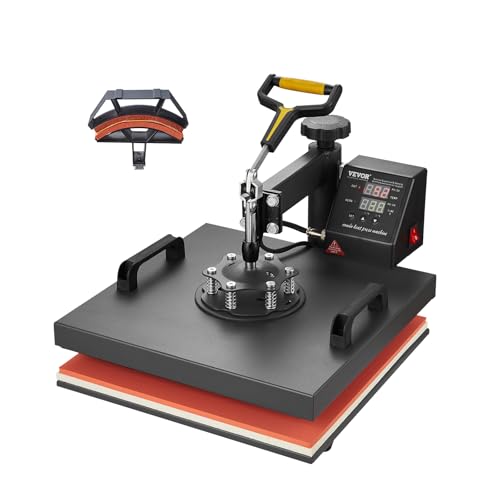
Some beginners want to make shirts and caps but have no interest in pressing mugs or plates. The VEVOR 2-in-1 narrows the accessory package to those two apparel formats. It provides a 15 x 15-inch flat platen and a 6 x 3-inch curved cap platen, giving the flat surface more room than the 12 x 15-inch VEVOR above while retaining a stated cap function. That makes the distinction easy to understand at the worktable: one format handles flat garments, and the other addresses curved caps.
The press uses a 360-degree swing-away design with a digital control panel for temperature and time. The listing also identifies a Teflon coating and an automatic alarm after heating finishes. The product information mentions shirts, pillows, bags, phone cases, caps, hats, ceramics, glass, and several textile categories, but those broad material references should not be read as a guarantee for every blank or transfer. Beginners gain a clear two-format setup, though they will need to allow workspace for the swing-away movement.
Pros
- Provides a stated 15 x 15-inch flat platen.
- Includes a stated 6 x 3-inch curved cap platen.
- Uses a 360-degree swing-away structure.
- Provides digital temperature and time controls.
- Includes an alarm to signal the end of heating.
Cons
- It does not include the mug and plate attachments listed with the VEVOR 5-in-1.
- The supplied information does not identify a numeric pressure range.
Choose this press if the beginner’s project list is centered on flat apparel and caps. The 15 x 15-inch platen gives more flat working area than the smaller VEVOR multifunction model, while the cap attachment keeps curved projects available. Buyers who want hands-free pressing should look toward the HTVRONT automatic option instead, since this VEVOR uses the traditional swing-away approach.
To buy this product, click here.
4. Fancierstudio Digital Heat Press 15 x 15 — Best Traditional Flat Press
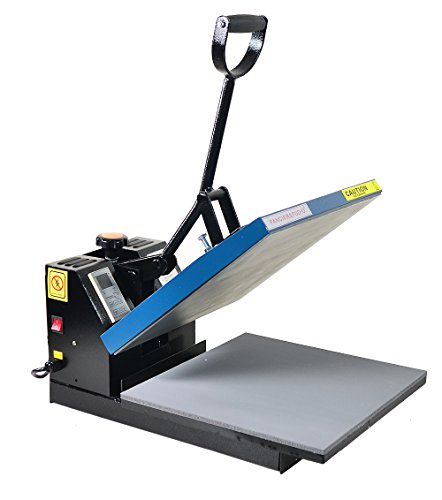
The Fancierstudio model keeps the beginner’s decision focused on a conventional flat press. Its stated 15 x 15-inch pressing area suits users who expect to work mainly with shirts or other flat projects, and the digital controls cover both temperature and time. The product information lists a 0 to 699°F temperature range and a 0 to 999-second time range, giving the user adjustable settings rather than a single preset. A beginner still needs to use the instructions supplied with the transfer material, since a broad selectable range does not establish actual temperature accuracy.
This press lists adjustable pressure, a silicone-gel base board, and a Teflon coating on the heat platen. It also specifies 110 volts and 1800 watts, details that matter when planning where the machine will be used. The straightforward arrangement may appeal to someone who wants to learn the basic relationship among garment placement, pressure, temperature, and time without adding cap or mug attachments. The trade-off is equally straightforward: the supplied information does not identify automatic pressing or automatic release.
Pros
- Provides a stated 15 x 15-inch pressing area.
- Lists a 0 to 699°F temperature range.
- Lists a 0 to 999-second time range.
- Provides adjustable pressure.
- Specifies 110 volts and 1800 watts.
Cons
- The product information does not identify automatic pressing or automatic release.
- No cap, mug, or plate attachment is listed with the product.
This model makes sense for a beginner who wants a full-size flat press and is comfortable operating the machine manually. Its stated electrical details are useful for planning a workspace, while its adjustable pressure gives the user a concrete control to learn. Buyers who prefer a more guided automatic cycle should look at HTVRONT, and users who want specialty formats should choose one of the VEVOR machines.
To buy this product, click here.
5. HTVRONT Mini Heat Press — Best for Small Projects
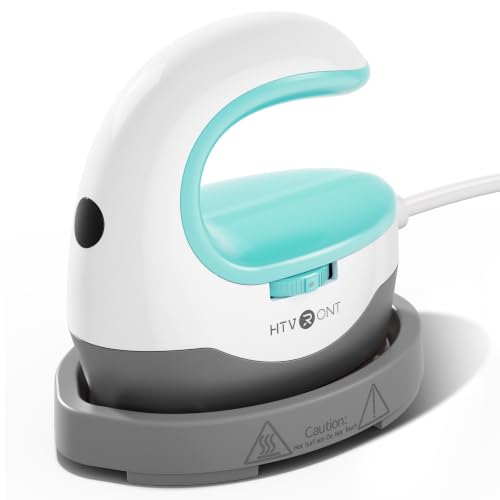
A mini press changes the beginner’s starting point. Instead of laying out a full shirt beneath a large platen, the user can work on small or unusually shaped designs where a broad machine would be awkward. HTVRONT lists three heat settings at 284°F, 320°F, and 356°F, selected with a sliding knob. The product information describes the tool for small HTV projects and sublimation ink projects, along with items such as clothing, hats, bags, masks, socks, and pillows.
The handheld format includes an insulated base and a handle, and the listing describes it as lightweight and easy to carry. That can be useful for a beginner who stores equipment between projects or takes supplies to a craft event. Its narrow format also creates a clear limitation: the supplied information does not present it as a replacement for a 15 x 15-inch flat press. Large shirt designs require more movement and repeated placement, so this model is best understood as a focused tool for small coverage areas.
Pros
- Offers three stated heat settings at 284°F, 320°F, and 356°F.
- Includes an insulated base.
- Uses a handle for handheld operation.
- Is described for small or unusual HTV projects.
- Is listed for sublimation ink projects as well as apparel and accessories.
Cons
- Its mini format is less suited to broad shirt designs than a 15 x 15-inch press.
- The supplied information does not identify a timer control or numeric pressure adjustment.
For a beginner decorating small logos, sleeve areas, socks, bags, or other tight spaces, this tool avoids the bulk of a full-size machine. A buyer planning large front-of-shirt designs should move up to a flat press instead. The defining trade-off is reach: the mini press offers focused handling, while a full-size unit covers more area in a single placement.
To buy this product, click here.
6. Calogy Mini Heat Press — Best Mini Press With a Display

The Calogy mini press gives a beginner a compact handheld alternative with more physical information shown on the machine. Its listed heat plate measures 2.87 x 4.43 inches, and an LED display shows the temperature. One-button controls handle temperature changes, unit switching, power, and shutoff. The three stated levels are 284°F, 320°F, and 356°F, so the control scheme remains simple while providing a visible reference during a small project.
The product listing also identifies a 15-minute automatic shutoff, a heat-resistant base, and a US plug rated for 110 to 220V. It describes the tool for small designs on shirts, clothing, hats, bags, masks, socks, and pillows. The stated dimensions and plate size make its role clear. This is a precision-style craft tool for limited areas, not a broad platen for positioning an entire large garment design in one pass.
Pros
- Provides a stated 2.87 x 4.43-inch heat plate.
- Shows the temperature on an LED display.
- Offers three stated temperature levels.
- Includes a 15-minute automatic shutoff.
- Includes a heat-resistant base and a stated 110 to 220V US plug.
Cons
- The stated heat plate is much smaller than the flat platens on the full-size presses.
- The supplied information does not identify a timer range or adjustable pressure system.
The Calogy is a sensible match for beginners who want a visible temperature readout and a small footprint for focused craft work. Its control layout may be more informative than a simple three-position switch, but its coverage remains limited. For large apparel graphics, a 15 x 15-inch machine will provide a more natural workspace, while this unit is better suited to small placements and detail work.
To buy this product, click here.
7. Cricut EasyPress SE 12 x 10 — Best for Cricut-Style Projects

The Cricut EasyPress SE occupies a middle ground between a mini handheld tool and a full 15 x 15-inch machine. Its 12 x 10-inch heat plate provides a defined flat work area, while the handheld format keeps the machine portable according to the product information. The listing identifies a ceramic-coated heat plate and controlled temperatures up to 400°F. It also states compatibility with major brands of iron-on materials, Infusible Ink, and sublimation products.
For a beginner, the supplied Cricut Heat Guide is a notable part of the experience. It provides time and temperature instructions for supported projects, which can make the first setup less mysterious than starting with a blank control panel. The easy-to-hold handle is described as supporting comfortable use and even pressure, though the published details do not provide a measured pressure specification. The 12 x 10-inch area is useful for many projects, but it remains smaller than the 15 x 15-inch platens selected above.
Pros
- Provides a stated 12 x 10-inch heat plate.
- Lists temperatures up to 400°F.
- Includes a ceramic-coated heat plate.
- Provides access to the Cricut Heat Guide.
- Lists compatibility with iron-on materials, Infusible Ink, and sublimation products.
Cons
- The 12 x 10-inch pressing area is smaller than the 15 x 15-inch flat presses.
- The supplied information does not identify automatic opening or a numeric pressure range.
This model suits a beginner who values a handheld form and guided project settings, especially within Cricut-style workflows. It may be less convenient for large transfers that nearly fill a shirt front, where a larger flat platen reduces repositioning. The central choice is between guided portability and the broader work area offered by a full-size digital press.
To buy this product, click here.
Buying Guide
Start With the Projects You Actually Want to Make
Beginners often buy a machine based on an attractive feature list, then discover that their real projects need a different format. A person making shirt fronts and tote bags will usually get more practical use from a 15 x 15-inch flat press than from a mini unit. Someone making small logos, sleeve designs, or occasional hat decorations may prefer a handheld press that can be moved around the workpiece. Write down the first three project types before comparing controls, because the pressing area determines much of the daily experience.
Flat Platen Size Changes Garment Positioning
The selected machines include 12 x 10-inch, 12 x 15-inch, and 15 x 15-inch formats, plus two mini presses with much smaller plates. A larger platen provides more working area, but it does not prove better temperature accuracy or more even heating. A smaller plate can still be useful when the design itself is small, though the user may need to reposition it for a broad graphic. Also separate the platen size from the machine’s overall footprint, since the supplied product information does not provide complete machine dimensions for every model.
Understand Manual, Swing-Away, and Automatic Operation
The VEVOR machines use a stated 360-degree swing-away structure. This means the upper platen moves away from the garment-loading area, so the workspace needs to accommodate that movement. The HTVRONT 15 x 15 model uses a slide-in board and automatic pressing and release after the user starts the cycle. Fancierstudio provides a conventional digital setup with adjustable pressure, while the handheld presses require the user to control placement and applied force directly. None of these formats removes the need to follow the transfer manufacturer’s instructions.
Look for Controls You Can Interpret
A timer and temperature setting are useful only when the user knows what the transfer material requires. The VEVOR 5-in-1 lists a 0 to 450°F range and a 0 to 999-second timer. Fancierstudio lists 0 to 699°F and 0 to 999 seconds. The mini models use three preset temperature levels, while the Cricut model is paired with a Heat Guide. A displayed setting is not the same as independently verified platen accuracy, so beginners should treat the machine’s control as a way to select the process settings rather than a guarantee of transfer results.
Decide Whether Attachments Are Worth the Extra Complexity
The VEVOR 5-in-1 includes flat, cap, mug, and plate attachments, with stated sizes for the specialty pieces. That can be useful for a beginner who wants to explore several project types without buying separate machines. The VEVOR 2-in-1 focuses on a 15 x 15-inch flat platen and a 6 x 3-inch cap platen. A broader attachment package does not automatically mean better results, and a listed 11-ounce mug attachment should not be treated as compatible with every mug. Match the attachment dimensions to the blanks you expect to use.
Check Electrical Information Before Setting Up
The Fancierstudio listing identifies 110 volts and 1800 watts. The Calogy listing identifies a US plug rated for 110 to 220V. Other products in this selection do not provide the same level of electrical detail in the supplied information. Do not infer outlet or circuit requirements from a model’s size, platen area, or brand. Place any full-size press on a stable workspace with room for the stated movement, and keep elevated-temperature equipment away from clutter and unattended use.
Keep Transfer Instructions Separate From Machine Claims
HTV, sublimation, and other transfer materials can have different instructions for time, temperature, pressure, peeling, and substrate preparation. A press listed for several applications may provide the heat and pressure controls needed for those workflows, but that listing alone does not establish perfect adhesion or compatibility with every blank. Beginners should follow the transfer manufacturer’s settings first, then use test pieces before committing a finished garment.
Best Heat Press for Beginners FAQ
What Size Heat Press Is Best for a Beginner?
A 15 x 15-inch flat press is a practical starting size for beginners who expect to make shirt fronts, tote bags, and other broad flat designs. It provides more working area than a mini or 12 x 10-inch handheld model. A smaller machine may be a better fit for small logos, sleeves, limited storage, or projects where the user wants to move the press over the design.
Is an Automatic Heat Press Easier for Beginners?
An automatic model can reduce manual steps. The HTVRONT automatic press selected here uses a slide-in board, starts after the user presses the “R” button, and releases after the timed cycle. The user still has to position the garment, select appropriate settings, and handle the transfer correctly. Automatic pressing should be viewed as a workflow feature, not a guarantee that every project will succeed without practice.
Should a Beginner Choose a Swing-Away Press?
A swing-away press can be useful when the user wants the upper platen to move away from the garment-loading area. The VEVOR models in this guide list 360-degree swing-away movement. That design also requires room for the upper section to rotate. A beginner with limited workspace may prefer a handheld press or a different machine format, while someone who wants a full-size press and cap capability may find swing-away operation worthwhile.
Can a 5-in-1 Press Make Every Type of Mug or Plate?
No. The VEVOR 5-in-1 listing identifies an 11-ounce mug attachment and two plate attachments with stated maximum diameters of 5 and 6 inches. Those details define the supplied formats more clearly than the general 5-in-1 label. Check the dimensions and shape of each blank before assuming it will fit, and do not treat a listed mug attachment as universal tumbler equipment.
Are Mini Heat Presses Suitable for Large Shirt Designs?
Mini presses can handle small or unusual areas, but they provide far less coverage than a 15 x 15-inch platen. A large shirt design may require repeated repositioning and separate passes. The HTVRONT and Calogy mini models are better matched with small HTV work, details, sleeves, bags, socks, and similar areas identified in their product information.
Does a Higher Maximum Temperature Mean a Better Beginner Press?
No. A maximum temperature describes the upper selectable limit, not temperature accuracy, heat distribution, or transfer quality. Fancierstudio lists a higher maximum than several products here, while the Cricut model lists operation up to 400°F. The more useful question is whether the machine provides the control range required by the transfer material and whether the operating format suits the project.
What Should Beginners Practice Before Pressing a Finished Shirt?
Practice garment positioning, design centering, timer selection, and the full loading and unloading sequence on a test item. Follow the transfer manufacturer’s instructions rather than relying on a universal setting. A ruler, measuring tape, or simple placement guide can help with alignment, but the supplied products in this roundup focus on the presses themselves, so those accessories are not included as product recommendations.
Final Verdict
The VEVOR 12 x 15-inch 5-in-1 is the strongest overall fit for beginners because its stated package covers several common project formats without limiting the user to a flat shirt platen. The 360-degree swing-away design, pressure-adjustment knob, digital temperature and timer controls, cap attachment, mug attachment, and two plate attachments give a new user several directions to explore. Its smaller flat area compared with 15 x 15-inch models is the main trade-off, and the specialty attachments still have defined dimensions.
For a simpler apparel workflow, the HTVRONT 15 x 15 automatic press offers automatic pressing and release with a full-size flat area. The VEVOR 15 x 15 2-in-1 is the more focused route for shirts and caps, while Fancierstudio suits beginners who want manual controls and stated electrical specifications. The HTVRONT and Calogy mini presses serve small designs, and the Cricut EasyPress SE adds a 12 x 10-inch handheld format with a Heat Guide. Match the press to the surface, project size, and amount of automation you genuinely need, then follow the transfer maker’s instructions for each material.
