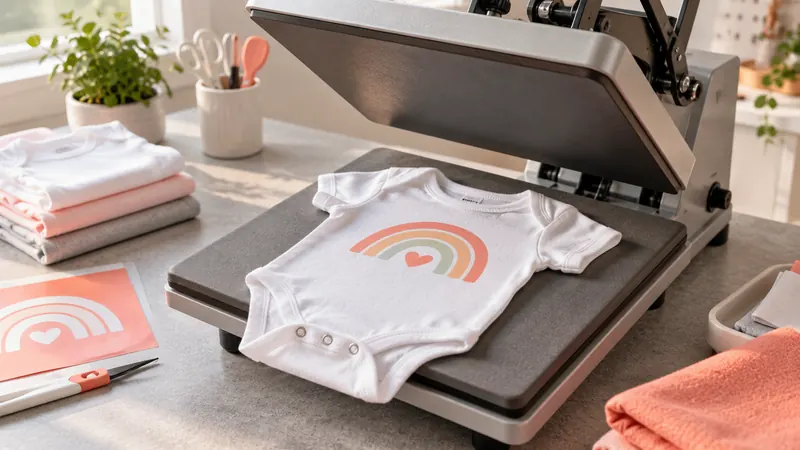
A onesie is a small garment with awkward edges, snaps, and a narrow working area, so a heat press that feels sensible for adult T-shirts can be unnecessarily cumbersome here. Buyers usually need enough room for a chest or back design, but they also need controlled positioning around the neckline, leg openings, and snap panel. A very large platen can work, yet it may offer little practical advantage for small infant apparel.
The common mistake is choosing by maximum temperature or platen size alone. For onesies, the useful questions are whether the press gives you a manageable pressing area, clear time and temperature controls, suitable pressure adjustment, and enough clearance to position one fabric layer beneath the transfer area. Different buyers will also prioritize different things. A beginner may want guided settings and straightforward controls, while a small apparel operation may prefer automatic pressing or a slide-out platen. The Cricut EasyPress SE is the strongest overall fit because its 9 x 9-inch format, controlled temperature, and supplied Heat Guide are well matched to small garment projects.
The products below range from compact handheld tools to larger automatic and slide-out machines. They are ranked for onesie work specifically, with attention to garment positioning, pressing area, control systems, pressure, and the practical trade-offs created by each design.
Quick Answer
- Best Overall: Cricut EasyPress SE for a 9 x 9-inch working area, controlled temperature, and Heat Guide support.
- Best Automatic Option: HTVRONT Auto Heat Press 2 for automatic pressing and release with adjustable pressure.
- Best Compact Manual Press: HTVRONT 10×10 Heat Press for pressure display, dual handles, and a smaller flat-press format.
- Best With Attachments: VEVOR 5-in-1 Heat Press for buyers who want to press onesies alongside hats, mugs, and plates.
Best Heat Press for Onesies Comparison Table
| Product | Best For | Press Type | Pressing Area | Control Or Workflow Feature |
|---|---|---|---|---|
| Cricut EasyPress SE | Most onesie projects | Manual flat press | 9 x 9 inches | Up to 400°F, Heat Guide |
| HTVRONT Auto Heat Press 2 | Automatic pressing | Automatic flat press | 15 x 15 inches | Adjustable pressure, auto release |
| HTVRONT 10×10 Heat Press | Compact flat pressing | Manual flat press | 10 x 10 inches | Pressure display, dual handles |
| VEVOR 12 x 10 Heat Press | Swing-away positioning | Swing-away flat press | 12 x 10 inches | 32°F to 450°F, 0 to 999 seconds |
| Fancierstudio Digital Heat Press | Conventional 15 x 15 pressing | Manual flat press | 15 x 15 inches | Adjustable pressure, digital controls |
| VEVOR 5-in-1 Heat Press | Onesies plus specialty items | Swing-away multifunction | 12 x 15 inches | Hat, mug, and plate attachments |
| HTVRONT 15×15 Auto Heat Press | Automatic garment pressing | Automatic flat press | 15 x 15 inches | Automatic pressure and release |
| Delclynee 16 x 24 Slide-Out Heat Press | Large-format apparel work | Clamshell with slide-out platen | 16 x 24 inches | Adjustable pressure, 12.25-inch pull-out |
| Cricut EasyPress Mini LT | Small logos and detail areas | Handheld mini press | Not stated | Up to 355°F, precision tip |
The detailed reviews explain how each machine handles the small, shaped work area of a onesie and where its particular mechanism makes sense.
1. Cricut EasyPress SE – 9 in x 9 in Heat Press — Best Overall

The 9 x 9-inch platen is a particularly sensible match for onesies. It gives enough room for many small front or back graphics without bringing the oversized working area of a 15 x 15-inch press to every project. A onesie can be positioned so the transfer area sits over a single layer of fabric, while the surrounding snaps and seams stay outside the immediate pressing zone.
Cricut lists a ceramic-coated heat plate with controlled temperatures up to 400°F, plus compatibility with major brands of iron-on, Infusible Ink, and sublimation products. The supplied Heat Guide provides material and blank guidance alongside time and temperature instructions. That combination is useful for a buyer who wants a defined starting point rather than a bare controller and a blank sheet of settings. The press remains manual, so the operator still places the garment and applies the press directly.
Pros
- Provides a stated 9 x 9-inch pressing area suited to small garment graphics.
- Reaches controlled temperatures up to 400°F.
- Includes access to the Cricut Heat Guide for time and temperature guidance.
- Supports major brands of iron-on, Infusible Ink, and sublimation products.
- Uses a ceramic-coated heat plate and an easy-to-hold handle.
Cons
- Manual pressing requires the operator to position and hold the machine for each cycle.
- The published information does not identify a pressure measurement or numeric pressure range.
This is the best fit for buyers focused mainly on onesies, small apparel, and guided heat-transfer projects. A larger automatic press may suit a broader garment workflow, while a mini press is better for tiny details, but the 9 x 9-inch format offers a more balanced primary tool for this specific garment.
To buy this product, click here.
2. HTVRONT Auto Heat Press 2 – Adjustable Pressure Heat Press Machine 15X15 — Best Automatic Option

The HTVRONT Auto Heat Press 2 takes a much larger approach to onesie work, with a stated 15 x 15-inch pressing area and automatic pressing after the parameters are set. The machine applies the press when the R button is activated, sounds a reminder when the timed cycle ends, and releases the material automatically. That sequence changes the operator’s role from holding the upper platen to loading the garment, setting the controls, and checking placement.
Pressure is adjustable up to the stated 80 kg, or 170 lb, and the listing identifies clearance for items up to 4.5 cm, or 1.77 inches, in height. Those details extend its use beyond thin onesies, although the larger frame and working area can be more machine than a buyer needs for a single small design. The published information also lists a temperature target of 410°F within 5 minutes and 30 seconds as a product claim, plus a 15-minute automatic shutoff feature.
Pros
- Provides a stated 15 x 15-inch pressing area.
- Includes adjustable pressure up to the listed 80 kg, or 170 lb.
- Automatically presses after the operating parameters are set.
- Automatically releases the material when the timed cycle ends.
- Lists clearance for items up to 4.5 cm, or 1.77 inches, in height.
Cons
- The 15 x 15-inch format is substantially larger than the 9 x 9-inch format of the Cricut EasyPress SE.
- The published information does not state the machine’s overall footprint or weight.
Choose this model if onesies are part of a wider apparel workflow and automatic pressing matters more than a small physical format. For occasional baby-garment projects, the larger platen, automatic mechanism, and pressure system may add complexity without being necessary.
To buy this product, click here.
3. HTVRONT Heat Press Machine for T Shirts with Pressure Display, 10X10 — Best Compact Manual Press

A 10 x 10-inch press keeps the working area close to the size needed for many onesie designs while leaving a little more room than the 9 x 9-inch Cricut. Its most distinctive control feature is a built-in pressure display that shows pressure data alongside time and temperature. The listing does not provide a pressure-accuracy tolerance, so the display should be treated as a guide to the machine’s pressure reading rather than a verified measurement standard.
The dual-handle design gives the operator two grip points while closing the manual press. The product information also identifies a ceramic-coated aluminum heat plate, an audible timer alert, an insulated safety base, and automatic shutoff after 15 minutes of inactivity. For a buyer who wants a conventional flat press with more information visible during the cycle, this layout is more detailed than a simple three-level mini press.
Pros
- Provides a stated 10 x 10-inch pressing area.
- Displays pressure, time, and temperature on the digital screen.
- Uses a dual-handle design for manual pressing.
- Includes an audible completion alert and 15-minute auto shutoff.
- Includes an insulated safety base.
Cons
- The pressure display does not come with a stated accuracy tolerance.
- The published information does not identify a numeric temperature range.
This press suits onesie makers who want a flat manual machine with a pressure readout and a footprint closer to the garment’s scale. Buyers who prefer guided settings may find the Cricut more informative, while buyers who want automatic release will need to move up to an automatic model.
To buy this product, click here.
4. VEVOR Heat Press Machine 12 x 10 in Sublimation Press Machine Swing Away — Best Swing-Away Option

The VEVOR 12 x 10-inch press brings a swing-away mechanism to a size that remains relevant for onesies, tote bags, pillowcases, and other smaller fabric projects. The upper heating element moves to the side rather than staying directly above the loading area. That changes how the garment is placed and removed, which can be useful when the operator wants the platen moved away before arranging the fabric.
Its digital controls cover a stated temperature range of 32°F to 450°F and a time range of 0 to 999 seconds. The listing also identifies double insulation and states that the exterior surface reaches 122°F to 158°F while the machine operates above 410°F. Those are published product claims, not independent measurements. The 12 x 10-inch area gives more room than a 9 x 9-inch press, though the longer shape may require careful placement around the onesie’s center panel.
Pros
- Provides a stated 12 x 10-inch pressing area.
- Uses a 360-degree swing-away design.
- Offers a stated temperature range of 32°F to 450°F.
- Offers a stated timer range of 0 to 999 seconds.
- Includes digital time and temperature controls.
Cons
- The published information does not identify a pressure range or pressure measurement.
- The 12 x 10-inch format may provide more area than needed for very small onesie graphics.
This model fits buyers who specifically prefer a swing-away loading arrangement and want one machine for onesies and other small flat projects. A fixed manual press has a simpler movement pattern, while an automatic 15 x 15-inch press offers a different workflow altogether.
To buy this product, click here.
5. Fancierstudio Digital Heat Press 15 x 15 — Best Conventional 15 x 15 Press
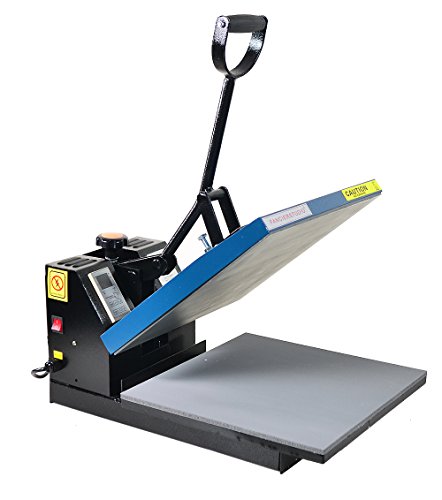
For onesies, the Fancierstudio’s 15 x 15-inch pressing area leaves considerable room around a small transfer. That extra space can be useful if the same machine will also handle larger apparel projects, but it means the garment must be centered carefully so seams, snaps, and extra layers do not sit beneath the design area. The machine uses a conventional flat heat-press format with adjustable pressure.
The digital controller provides electronic time and heat control, with a stated temperature range of 0°F to 699°F and a timer range of 0 to 999 seconds. The listing also identifies a 110-volt, 1,800-watt electrical specification, a silicone-gel base board, and a Teflon-coated heat platen. Those details describe the controls and supplied construction features, but they do not establish temperature accuracy or heat uniformity.
Pros
- Provides a stated 15 x 15-inch pressing area.
- Includes adjustable pressure.
- Provides electronic time and heat controls.
- Lists a temperature range of 0°F to 699°F.
- Includes a Teflon-coated heat platen and silicone-gel base board.
Cons
- The large pressing area requires careful onesie positioning around snaps and seams.
- The published information does not identify an automatic opening or release function.
This is a reasonable fit for buyers who want a conventional 15 x 15-inch machine that can handle onesies alongside larger apparel. It is less targeted to small garment work than the 9 x 9-inch Cricut, and the listing does not provide a special positioning feature for infant garments.
To buy this product, click here.
6. VEVOR Heat Press Machine 12×15 5-in-1 360° Swing Away — Best With Attachments

The VEVOR 5-in-1 gives onesie buyers a 12 x 15-inch flat platen, then adds dedicated listed attachments for hats and caps, an 11-ounce mug, and two plate sizes. That makes it a different proposition from a single-purpose garment press. The flat platen is larger than necessary for many onesie designs, but the broader package may make sense if infant apparel is one part of a mixed transfer setup.
The 360-degree swing-away design moves the upper platen aside during loading. Digital controls provide a stated range of 0°F to 450°F and 0 to 999 seconds, while the pressure adjustment knob allows manual pressure changes. The product information also identifies a Teflon-coated flat platen, overheat protection, a circuit breaker, and a built-in completion beep. The attachments should be viewed as specific included tools, not proof that every kind of hat, mug, or plate will fit.
Pros
- Provides a stated 12 x 15-inch flat pressing area.
- Includes a 360-degree swing-away mechanism.
- Includes listed hat, mug, and plate attachments.
- Provides a stated temperature range of 0°F to 450°F.
- Includes adjustable pressure, a timer, and a completion beep.
Cons
- The 12 x 15-inch flat platen is larger than the working area needed for many onesies.
- The supplied mug, hat, and plate dimensions limit the attachment applications described by the listing.
This machine belongs on the shortlist for buyers who want onesie pressing plus several named specialty applications. If the only goal is infant apparel, its attachments add equipment that may see little use, and a smaller flat press will be more focused.
To buy this product, click here.
7. HTVRONT Heat Press Machine for Tshirts 15×15 — Best Automatic Pressure Option

This HTVRONT model uses a 15 x 15-inch platen and describes an automatic cycle that detects the item’s thickness up to 1 inch, controls the stated pressure, and releases the item after pressing. For a onesie, that means the operator sets the time and temperature, positions the garment, and activates the automatic mode rather than manually holding the press closed throughout the cycle.
The listing also identifies four fast modes, two customer-defined modes, a drawer-style placement plate, and automatic shutoff after 15 minutes of inactivity. It states that the machine reaches 320°F within 4 minutes and 410°F within a shorter warm-up period than another comparison described in the listing. Those are published claims and should not be treated as independent testing. The machine also lists compatibility with totes, apparel, wood signs, and ceramic coasters up to 1 inch in thickness.
Pros
- Provides a stated 15 x 15-inch pressing area.
- Automatically determines thickness up to the listed 1-inch limit.
- Automatically controls pressure and releases the item after pressing.
- Includes four fast modes and two customer-defined modes.
- Uses a drawer-style placement plate and 15-minute auto shutoff.
Cons
- The 15 x 15-inch format is much larger than the typical design area on a onesie.
- The published information does not provide a numeric pressure range.
This option suits buyers who want automatic operation across onesies and other apparel projects. Its automatic pressure and release features distinguish it from the Fancierstudio, while the smaller Cricut remains a more targeted choice for occasional, small-format work.
To buy this product, click here.
8. Delclynee 16 x 24 Slide-Out Heat Press — Best Large-Format Option

The Delclynee is the largest machine in this group, with a stated 16 x 24-inch platen and a lower platen that extends 12.25 inches. For onesies, that surface area is far beyond the size of a single infant garment design, yet it can be relevant if the same setup will also handle oversized transfers or larger apparel. The slide-out movement changes loading because the lower platen can be pulled toward the operator before the garment is positioned.
The press uses a high-pressure clamshell format with an adjustable pressure knob, a stated temperature range of 32°F to 455°F, and a timer range of 0 to 999 seconds. The listing also describes a threadable workspace, an automatic locking mechanism for the pull rod, and an audible alarm that sounds five beeps when the target temperature or timed cycle is reached. Its supplied 110-volt and 1,500-watt specifications are clearly stated, while the overall machine dimensions and weight are not.
Pros
- Provides a stated 16 x 24-inch pressing area.
- Includes a lower platen that extends 12.25 inches.
- Uses an adjustable pressure knob.
- Provides a stated temperature range of 32°F to 455°F and timer range of 0 to 999 seconds.
- Includes a threadable workspace and pull-rod locking mechanism.
Cons
- The 16 x 24-inch format is disproportionate to most onesie designs.
- The published information does not identify the machine’s overall dimensions or weight.
This press is best reserved for buyers who need a large-format apparel machine that can also handle onesies. Its slide-out platen is a meaningful mechanical distinction, but the large pressing area and unspecified footprint make it a poor match for a small, onesie-only station.
To buy this product, click here.
9. Cricut EasyPress Mini LT — Best for Small Details
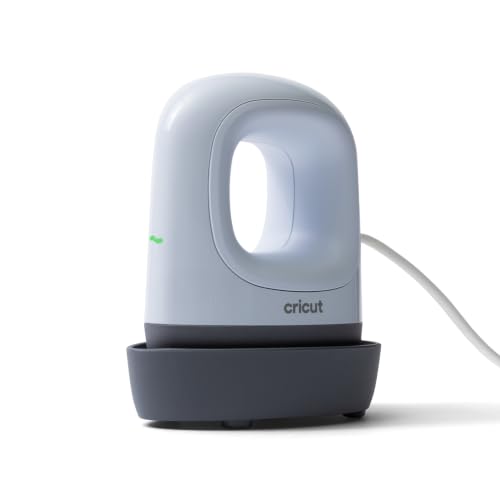
The Cricut EasyPress Mini LT is a handheld detail press rather than a full-size flat machine. Its precision tip and ceramic-coated heat plate are aimed at small or unusually shaped transfer areas, which can be useful on a onesie with a tiny name, icon, or sleeve detail. The listing states that the press reaches up to 355°F, or 180°C, and includes an insulated safety base for storage between pressing passes.
The Cricut Heat Guide provides compatible material and blank information, time settings, and step-by-step instructions. That support gives the Mini LT a clearer process starting point than a basic household iron, but the small format also means a larger design must be covered in sections. The published information does not state the heat-plate dimensions, so the exact working area is not available for comparison with the 9 x 9-inch EasyPress SE.
Pros
- Uses a precision tip for small or unusually shaped transfer areas.
- Reaches a stated maximum temperature of 355°F, or 180°C.
- Includes a ceramic-coated heat plate.
- Includes an insulated safety base.
- Provides access to the Cricut Heat Guide.
Cons
- The published information does not state the heat-plate dimensions.
- Its mini format is less suitable for covering a larger onesie design in one pass.
This is a useful secondary choice for names, small graphics, and tight garment areas where a broad platen is awkward. Buyers seeking one primary press for most onesie designs should choose the Cricut EasyPress SE or another flat machine with a stated pressing area.
To buy this product, click here.
Buying Guide
Match the Pressing Area to the Onesie
For onesies, a smaller platen can simplify garment placement because the operator has less unused surface surrounding the transfer. A 9 x 9 or 10 x 10-inch area is close to the scale of many infant-garment designs, while 12 x 10 and 12 x 15-inch presses provide extra room for larger graphics and other fabric items. A 15 x 15 or 16 x 24-inch platen is better understood as a broader apparel choice rather than a onesie-specific advantage.
Look for a Way to Keep the Design Area to One Fabric Layer
Onesies include snaps, seams, and overlapping fabric that can complicate pressing. A threadable or slide-out workspace can change how the garment is loaded, while a flat manual press requires careful positioning. The supplied information does not establish that any one machine fits every onesie shape, so check the garment construction and place the transfer over a single layer whenever the transfer instructions require it.
Choose Manual, Swing-Away, or Automatic Operation
A manual press requires the operator to position and close the machine. A swing-away model moves the upper platen aside during loading. Automatic models in this group describe automatic pressing, pressure control, or release, but those functions do not by themselves prove faster production or better transfer results. Select the mechanism that matches the way you want to load and monitor each garment.
Read Temperature and Timer Specifications Carefully
A stated temperature range tells you what the controller is designed to set, not how closely the actual platen matches the display. The Cricut EasyPress models add Heat Guide support, while several other machines list numeric temperature and timer ranges. Always use the transfer manufacturer’s instructions for the specific HTV, sublimation product, or other transfer rather than treating one universal setting as suitable for every onesie.
Decide Whether Attachments Matter
The VEVOR 5-in-1 includes a flat platen plus listed hat, mug, and plate attachments. That makes it relevant for a mixed project setup, but attachments add functions that are unnecessary if the machine will press onesies only. A focused flat press may be the clearer choice for infant apparel, while a multifunction model makes more sense when the additional listed formats will receive regular use.
Check Electrical and Workspace Information
Several products publish electrical details, including 110-volt models and stated wattage. Those figures should be preserved as listed rather than converted into assumptions about speed or outlet suitability. The overall dimensions and weight are not supplied for every press, so measure the intended work surface and verify the machine’s full footprint before ordering.
Best Heat Press for Onesies FAQ
What size heat press is suitable for onesies?
A 9 x 9 or 10 x 10-inch press is a practical starting point for many onesie designs because the working area is close to the garment’s scale. A 12 x 10 or larger press can provide more room, but it also requires more careful positioning around snaps, seams, and unused fabric.
Is a mini heat press enough for a onesie?
A mini press can handle small names, icons, and detail areas. It may require several passes for a larger design because its exact coverage area is smaller or, in the case of the Cricut EasyPress Mini LT, not clearly stated in the supplied specifications. A 9 x 9-inch press is a more suitable primary machine for broader onesie graphics.
Is an automatic press better for onesies?
An automatic press can apply its described pressing and release functions after the operator sets the parameters. That changes the loading and monitoring process, but automatic operation does not establish better transfer quality, higher output, or labor savings. Its value depends on whether you want those specific mechanical functions across your other projects.
Should the onesie be threaded onto the lower platen?
Threading can help place a garment so the heat and pressure contact one fabric layer, but the correct method depends on the press, garment construction, and transfer instructions. The Delclynee listing specifically identifies a threadable workspace. Other machines may require a different loading approach, so inspect the garment before closing the press.
Can a heat press for onesies also press larger shirts?
Yes, a larger flat press can provide more working area for shirts, while a 9 x 9 or 10 x 10-inch press is more limited by its stated platen size. The products in this guide vary from the 9 x 9-inch Cricut to the 16 x 24-inch Delclynee, so choose according to the largest transfer you expect to position rather than the onesie alone.
Do I need adjustable pressure for onesies?
Adjustable pressure gives the operator a way to change the press setting, but it does not guarantee a particular transfer result. The HTVRONT Auto Heat Press 2, Fancierstudio, Delclynee, and VEVOR 5-in-1 list pressure adjustment or pressure control. Follow the transfer supplier’s instructions and avoid assuming that one pressure setting suits every garment and material.
Can I use the same temperature for every onesie transfer?
No. Temperature, time, and pressure can vary by transfer material, garment composition, coating, and supplier instructions. A press may offer a broad temperature range or a guide, but those controls do not create one universal setting for HTV, sublimation, or other transfer types.
Final Verdict
The Cricut EasyPress SE is the strongest overall choice for onesies because its stated 9 x 9-inch pressing area is closely matched to small garment graphics, its controlled temperature reaches up to 400°F, and its Heat Guide provides material and time guidance. It remains a manual press, and the supplied information does not provide a pressure range, but its format is more focused on small apparel than the much larger 15 x 15 and 16 x 24-inch machines.
Choose the HTVRONT 10×10 if a pressure display and dual-handle manual format matter, or the VEVOR 12 x 10 if a swing-away design better suits your loading routine. The HTVRONT Auto Heat Press 2 and HTVRONT 15×15 Auto bring automatic pressing and release to a wider apparel setup, while the VEVOR 5-in-1 adds named hat, mug, and plate attachments. For small names and detail work, the Cricut EasyPress Mini LT is the specialist option, but its limited working area makes it better as a detail tool than as a sole onesie press.
